building a product in the ai wave: the development story of Brevia
12 min read
·…
tl;dr:a practical account of building Brevia, a desktop meeting-transcription app.
I used to have a bit of a code purity complex: if I saw a Claude bot among the contributors to a GitHub project, I would immediately assume the project was unreliable. I would think it had been built by a developer who was new to vibe coding and did not really understand software engineering or design patterns. For some reason, that gave me a vague sense of superiority.
Obviously, that bias was narrow-minded. And I am not exactly a brilliant programmer myself. So when I encountered AI that was both incredibly fast and genuinely effective, I quickly embraced it. Whether I am coding, analysing, or trading stocks, I instinctively turn to AI for help. My token usage makes that fairly clear:
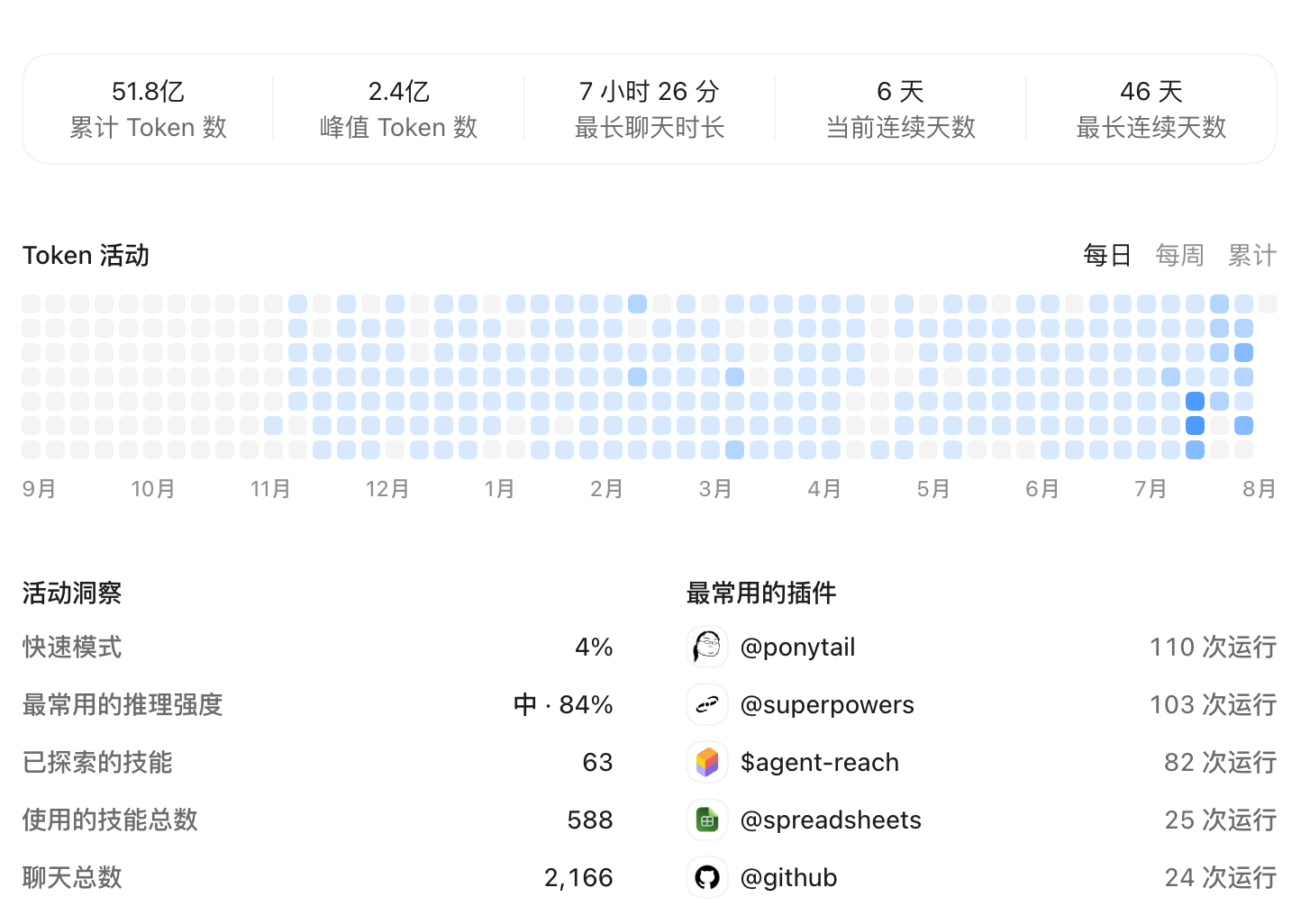
I recently watched an interview with the dean of a university software-engineering school. The host asked whether software engineering feels pressure from the AI wave. The dean answered that, in the AI era, teaching is no longer about how to write code, but why it should be written that way. He compared it to the spread of cameras: everyone can take photographs, yet professionals still need to learn photography in order to express what they want to say. I strongly agree. I have also been coding intensively with AI lately, and that experience says something about AI’s current role in software development—hence this post.
meeting transcription
In mid-July, I went to Beijing to meet a client. Since I needed meeting notes, I looked into transcription and note-taking apps. The representative options I found were Meetily, iFlytek here, and Feishu Minutes. Meetily is open source; the other two require payment in one form or another.
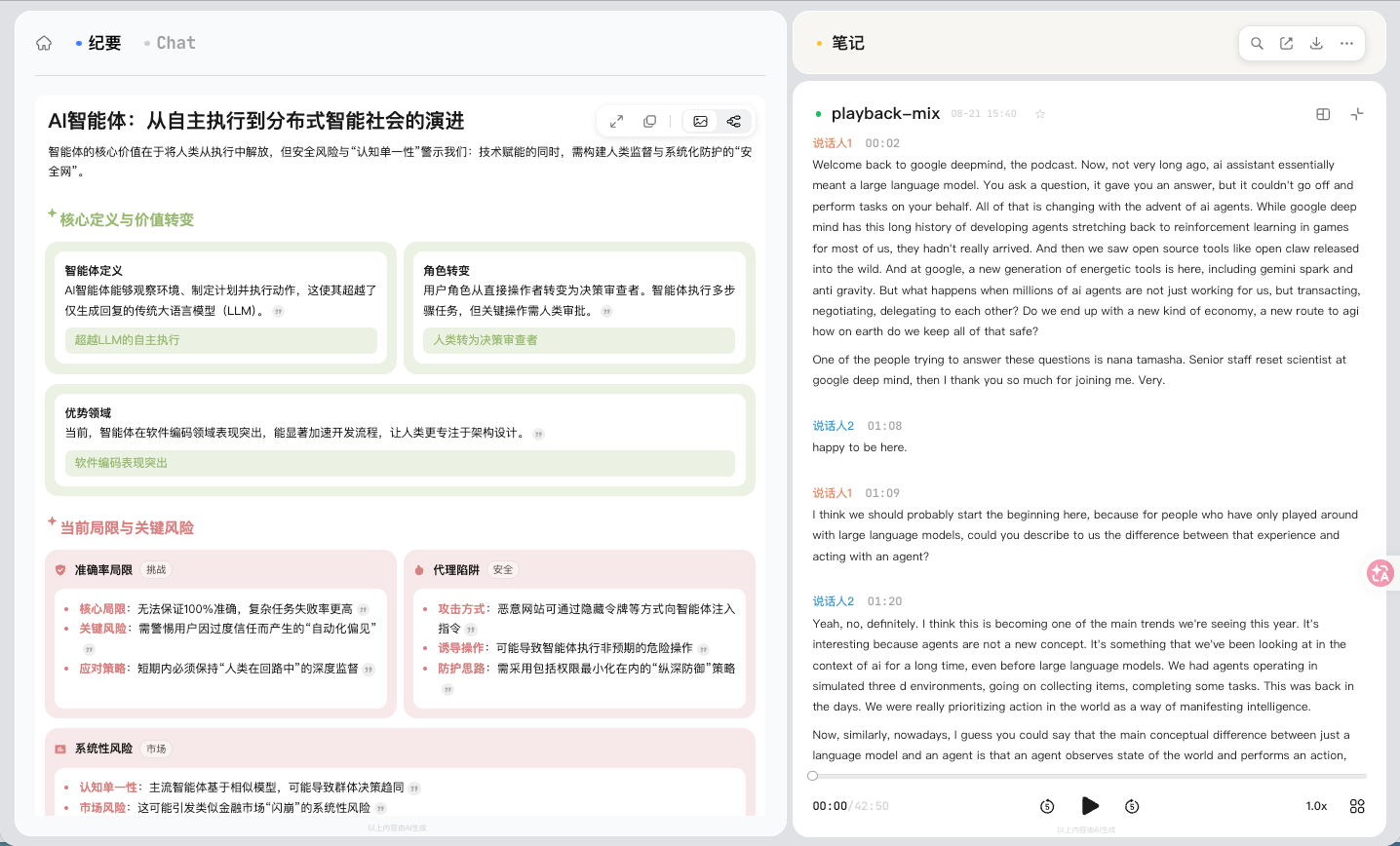
From my personal experience, Feishu Minutes is excellent. You can sign in on the web without downloading an app; it supports multiple languages, has accurate speaker recognition, and produces high-quality AI meeting summaries with text and images. Its shortcomings are that it does not support subtitle translation, and both its AI summaries and recording transcription have duration limits. Quite a few people on Reddit have mentioned it while looking for free alternatives.
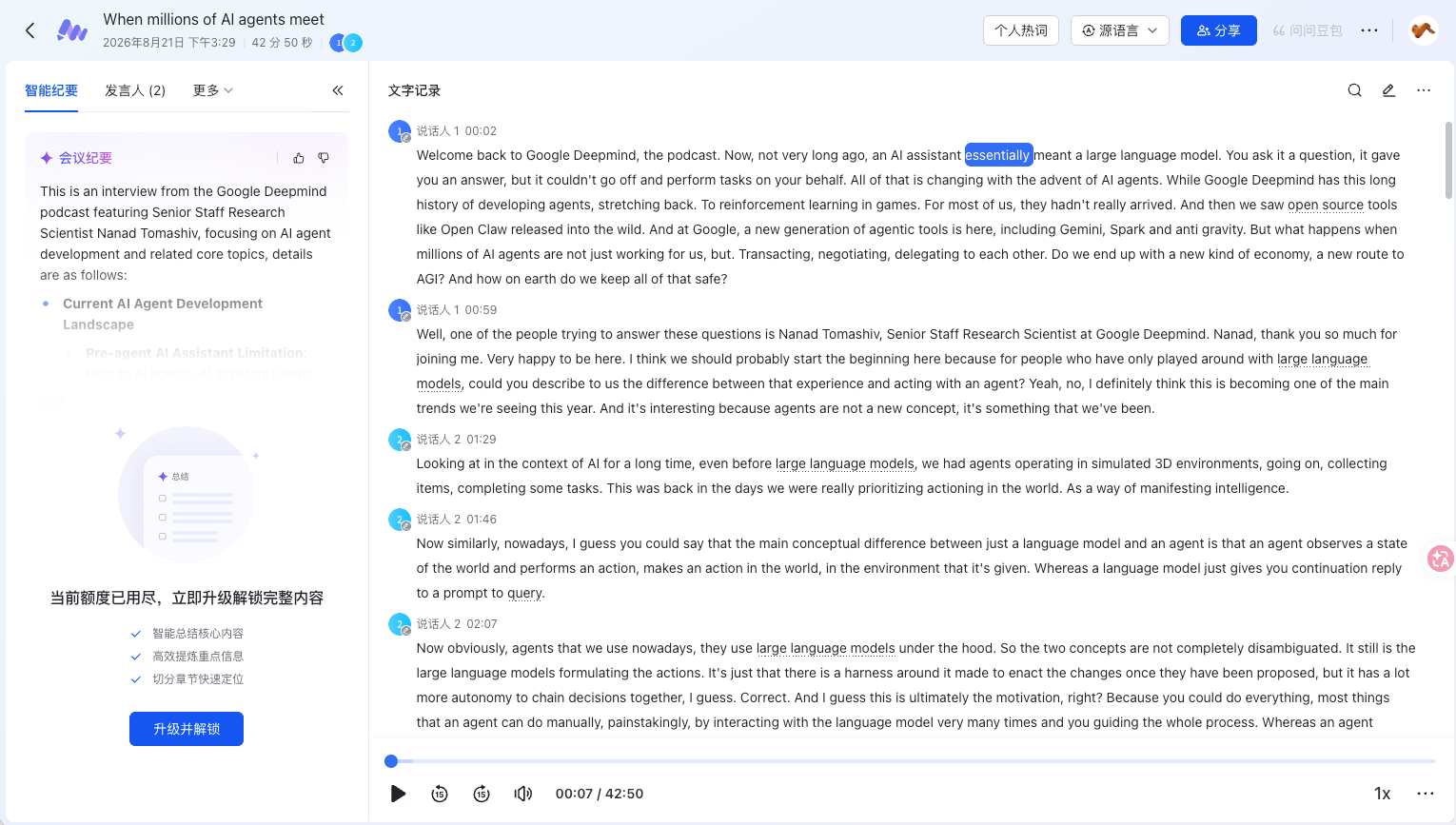
iFlytek here is broadly similar to Feishu Minutes. It supports both app- and web-based recognition as well as mobile use. Other than the cost, the barrier to entry is low and the experience is smooth. Like Feishu Minutes, it uses WebSocket APIs for transcription, so it needs an internet connection and does not support subtitle translation. Its smart minutes can be exported as rich text or plain text, and make a strong first impression.
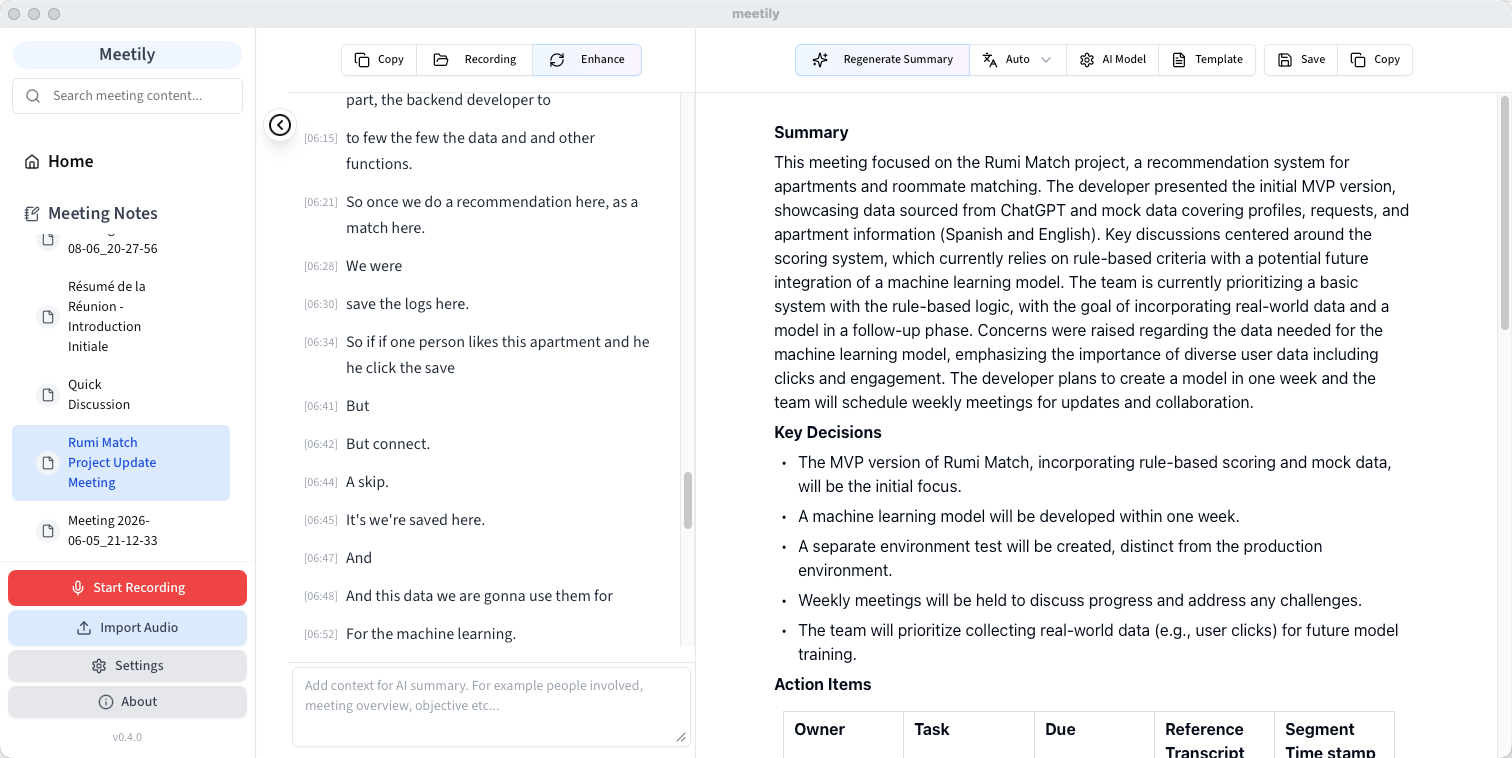
Meetily is open-source software with nearly 30,000 stars on GitHub. Because it is free, it was the first one I tried, mainly for keeping records when meeting with overseas developers. It uses locally deployed transcription models and also supports AI-generated meeting notes. On first installation, it asks you to download a transcription engine and a local AI model. According to its documentation, it uses NVIDIA Parakeet 0.6B and Whisper for transcription. Both are strongest in English, so the Chinese experience is not ideal. For AI, it uses Qwen3.5 and Gemma3; in terms of analytical speed and results, neither caused serious hallucination issues.
Between usability and cost, each of these left something to be desired. I prefer a perpetual licence to a subscription, yet there are no especially compelling one-time-purchase Chinese meeting-note apps. More importantly, it had been a while since I last tinkered with something, and I wanted to build an app simply to enjoy development again.
just do it
I quickly put together a requirements document. I wanted a desktop meeting-transcription app with:
- real-time transcription
- AI-generated meeting notes
- multilingual support and translation
- configurable hotwords
- low performance overhead and controlled power consumption
This was the initial design document:
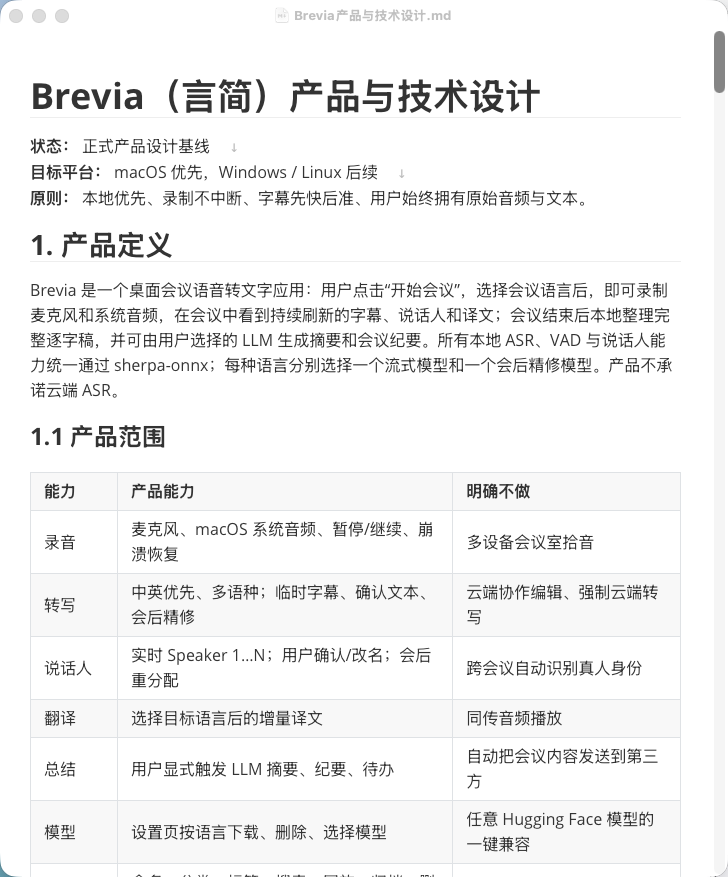
I was clearly not going to write all the code myself. The last time I coded seriously was from October to December 2025, when I was working on NextRec. I started with the backend. My initial plan was a native macOS app, recreating Meetily’s architecture with JavaScript and Rust. In the first version, performance considerations led me to use whisper.cpp: use VAD to detect speech intervals, then call Whisper frequently for transcription.
After several days of intense vibe coding with Codex, I got the first demo—an incredibly ugly thing. I cannot honestly call it an application, and I did not keep any other screenshots of it:
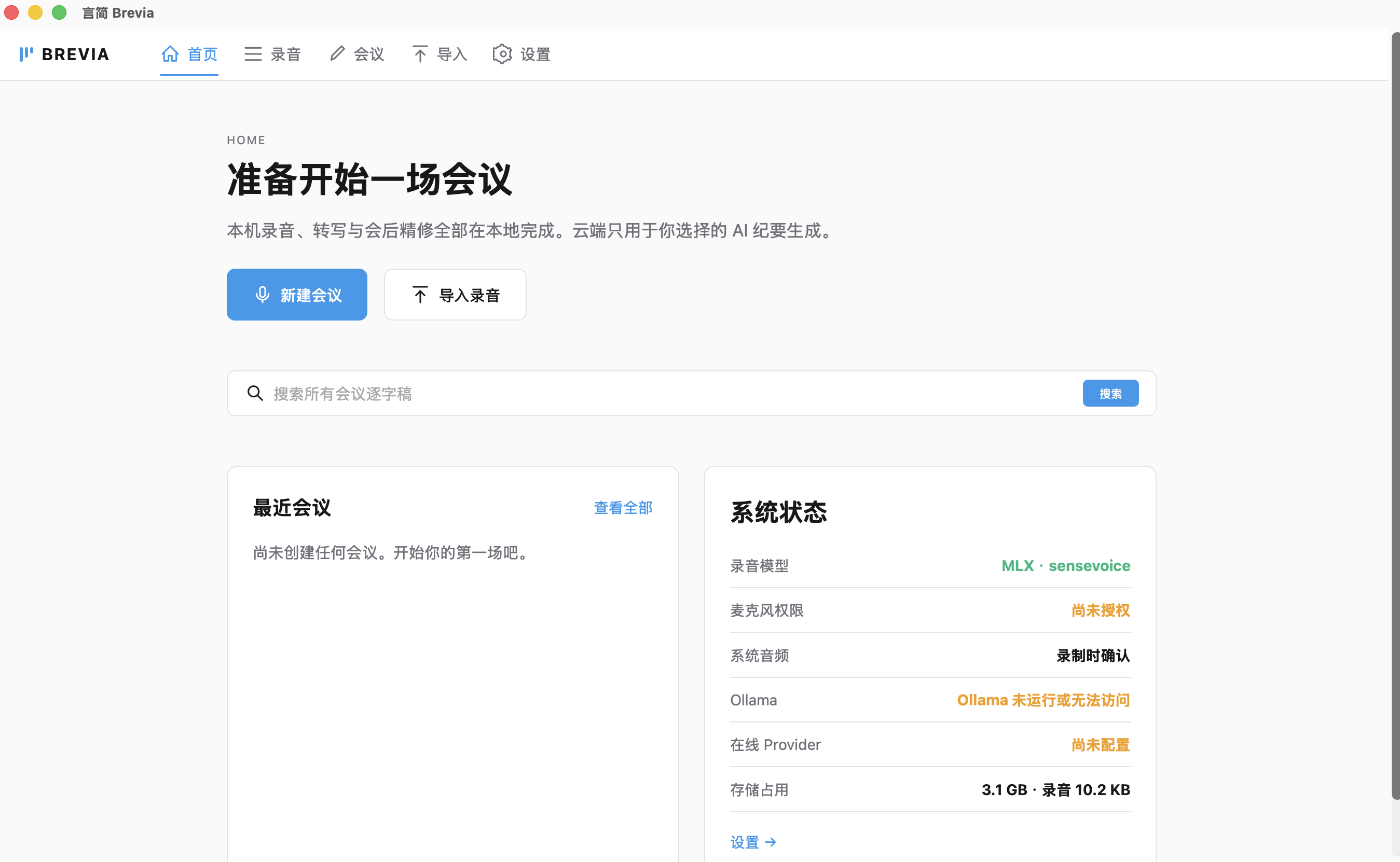
Codex’s default visual taste was plainly poor: exposed parameters, no attractive palette, and no coherent styling. Worse than the aesthetics, however, was the transcription engine. It was only the most basic VAD detection plus transcription. The model was repeatedly loaded and run for inference, Chinese recognition was inefficient, subtitles responded slowly, the beginning of speech was cut off, and accuracy was poor.
That setback hit hard. I deleted the project and did not open Codex again for two full weeks.
sherpa-onnx and a second attempt
I had essentially shelved the idea after that first attempt. Two weeks later, though, I came across an ASR overview that mentioned FunASR, an open-source speech-recognition toolkit supporting many open models, streaming output, speaker recognition, and more. It is written in Python. Before then, my Python deployment experience had not been great—probably because I mostly use FastAPI for services, which is not well suited to packaging as a conventional application. It is also built on Transformers, so I did not expect much from its performance.
In one post, someone compared FunASR with sherpa-onnx. After a quick look at the latter’s project description, I was motivated again. sherpa-onnx is comprehensive: it uses quantized models, supports a broad model list and all kinds of ASR APIs—noise suppression, VAD, streaming subtitles, and more. Several popular transcription projects in the open-source community already use it as their backend.
With the backend engine settled, the remaining work was frontend design. Having learned from the first attempt, I designed the UI style before writing the backend: a restrained, less-is-more look with whitespace and line-based divisions. After a few failed attempts, I finally had a visual direction for the app.
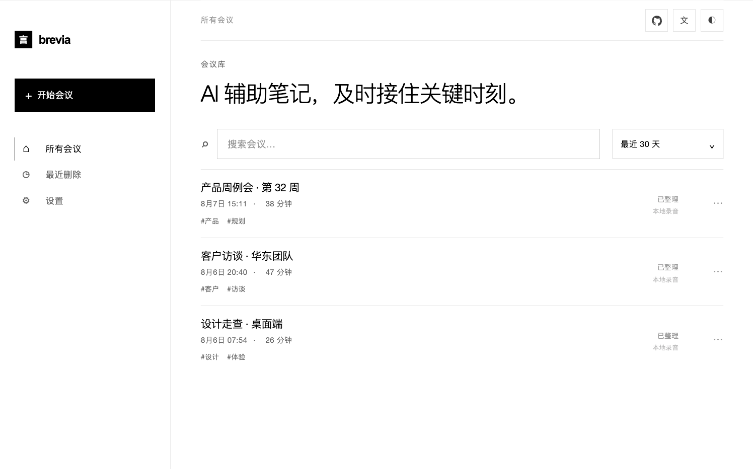
With Codex, development became much easier. I only needed to describe the requirements, then periodically ask the model to review the code, run performance stress tests, and clean up and organise the codebase. This process can keep technical debt under some control. After roughly a week of tinkering, I released the first version of Brevia on August 1.
the road through the pitfalls
The first obstacle after release was signing. Both macOS and Windows have signing requirements. On macOS, unsigned apps fail directly and require users to use the terminal before they can run them. That is fatal to the user experience. At first I was not sure I wanted to treat this as a real product, so I hesitated over paying for an Apple Developer membership. During those days of indecision, I happened to make some money in the stock market. That was the final push I needed to apply—haha.
As versions iterated, I gradually encountered and fixed many bugs.
application permission requests
In the first few versions, permission requests consistently failed, particularly for Screen Recording and microphone access. When users first opened the app, the system permission dialog never appeared, so they had to grant access manually in Settings. I eventually found that the UI was blocking permission requests from the main process.
windows
In early versions, Windows users saw the app crash immediately after clicking its icon. Windows’ default GBK encoding meant that JSON files containing Chinese could not be parsed. Microphone permission detection was also wrong: it showed as authorised, while the app still could not detect the microphone. Electron’s Windows permission API is unreliable; it does not fully check application permissions and system-level toggles.
ASR refinement
Across several versions, ASR post-processing had obvious quality problems:
- repeated characters: subtitles could produce repetitions such as “th-th-this issue.” The cause was repeated inference during long silences, which duplicated output tokens. I fixed it with regular expressions and backend-level text deduplication.
- broken sentences: when a user spoke a long sentence, subtitles could be split into semantically disconnected fragments. The cause was sherpa-onnx’s hard rule that forcibly cuts output after a given point. The solution was semantic segmentation based on periods, commas, and pauses, plus a second refinement stage using a higher-quality model to maintain a window of recent streaming subtitles.
- over-segmented speakers: a single person’s continuous speech was split into many consecutive two- or three-second clips. The fix was to merge segments from the same speaker when the pauses between them were short.
out-of-memory errors and zombie processes
For recordings longer than an hour, clicking “post-meeting refinement” would show “processing failed” after five minutes. The cause was loading the entire audio segment into memory. When refining a long meeting, the worker could exceed 8 GB and then be killed by the OOM killer. I changed it to load audio through a sliding window for streaming transcription. Later, there was also a zombie process that was never released after loading the LLM sidecar.
automatic updates
In earlier versions, in-app updates relied on a pop-up that sent users to GitHub, where they manually downloaded the full release installer. This was far too inefficient. I later switched to differential updates: each packaged release uploads blockmap files and latest.yaml, then the app compares the latest release’s changed blocks, updates incrementally, and installs automatically.
background tasks
For several versions, users could not pause or cancel background refinement and AI-summary tasks. I later added threading.Event to control multiprocessing state.
response formats from different LLMs
Different LLM providers return responses in inconsistent formats—for example, some return "choices": [{"message": {"content": "..."}}], while others return "content": [{"type": "text", "text": "..."}]. That occasionally caused summary generation to fail, so I wrote adapters for the different response formats.
Claude Code summarised the entire Git commit history and reached the following conclusion:
Brevia went from v0.1.0 to v1.1.2 in 24 days, with 42 releases and roughly 40 bug fixes. The three areas with the highest concentration of problems were:
- cross-platform compatibility (encoding, line endings, permission APIs) — 30%
- release workflow (signing, notarisation, automatic updates) — 25%
- ASR quality and performance (refinement, memory, real-time behaviour) — 20%
the biggest lessons:
- The complexity of cross-platform projects is easy to underestimate; Windows and macOS differ far more than expected.
- Release workflows must be tested end to end in a production-like environment. You cannot assume that a local build is ready to ship.
- Control signals for long-running tasks, state-machine completeness, and resource lifecycle management all need to be considered during design.
the most valuable practices:
- A problem-reproduction toolchain built from seven diagnostic scripts.
- Windowed audio processing to solve the memory issue.
- A multi-level fallback LLM response parser.
- Explicit encoding declarations to prevent garbled text on Windows.
subtracting from the product, and a new idea
My original vision was simply a transcription tool: multilingual transcription and translation, plus voiceprint recording for speaker identification and speech generation.
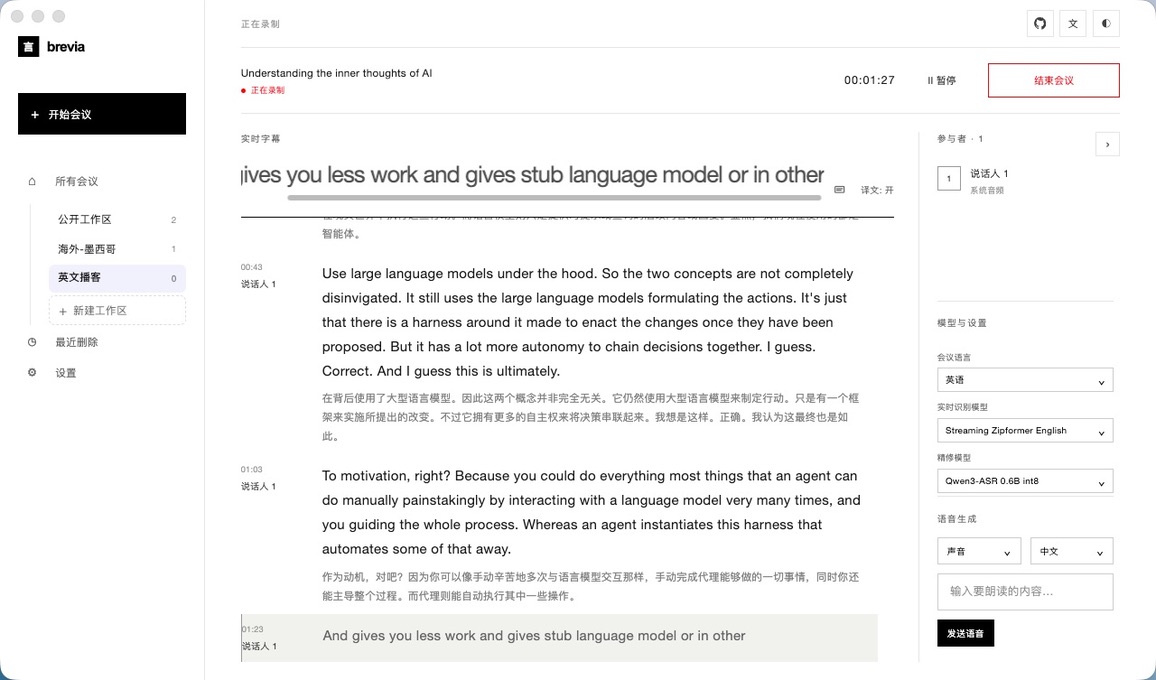
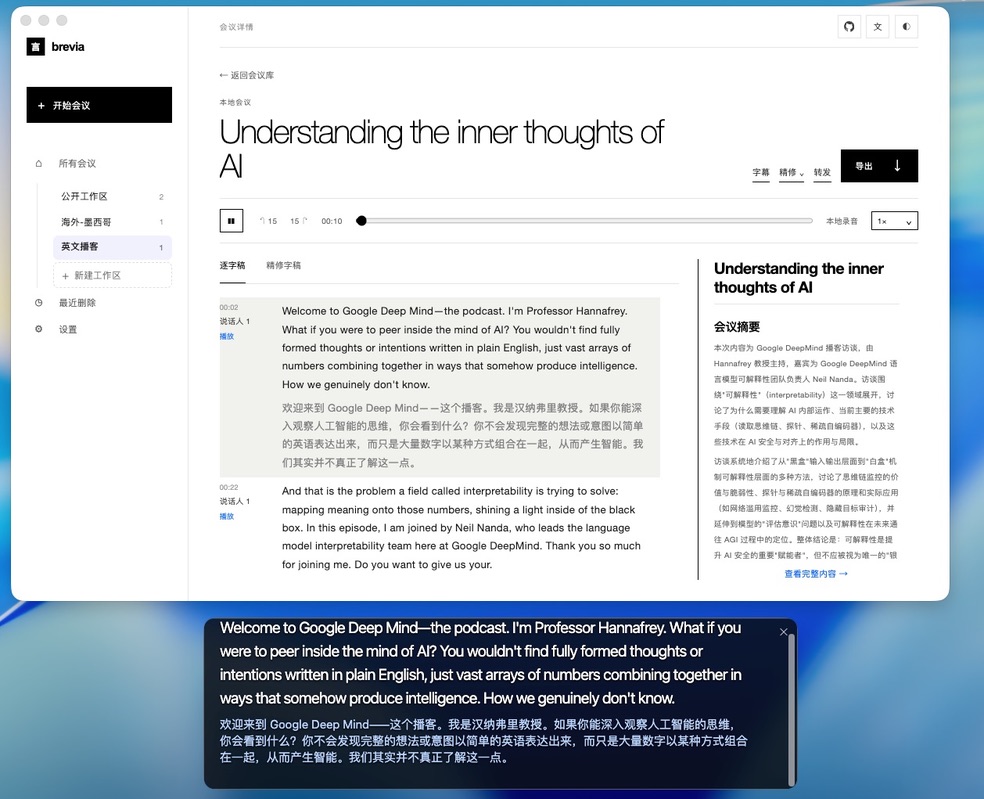
But while using it myself, I found that I rarely touched the settings area on the right; often I only needed the meeting subtitles. In the last few releases, I therefore added floating subtitles and substantially simplified the interface. I also removed flashy features such as TTS speech generation. In addition, instead of downloading a separate language pack for every language, the app now uses a general transcription model, with dedicated models only for Chinese, English, and Korean. The number of built-in AI models was reduced from four to two.
Less is more.
notes and AI-assisted features
As I simplified the interface, I began considering other possibilities for the app. Since other meeting-note products include note-taking, I considered adding it too.
But what would make it different?
I did not want to make an undifferentiated commodity product. How could I create a difference?
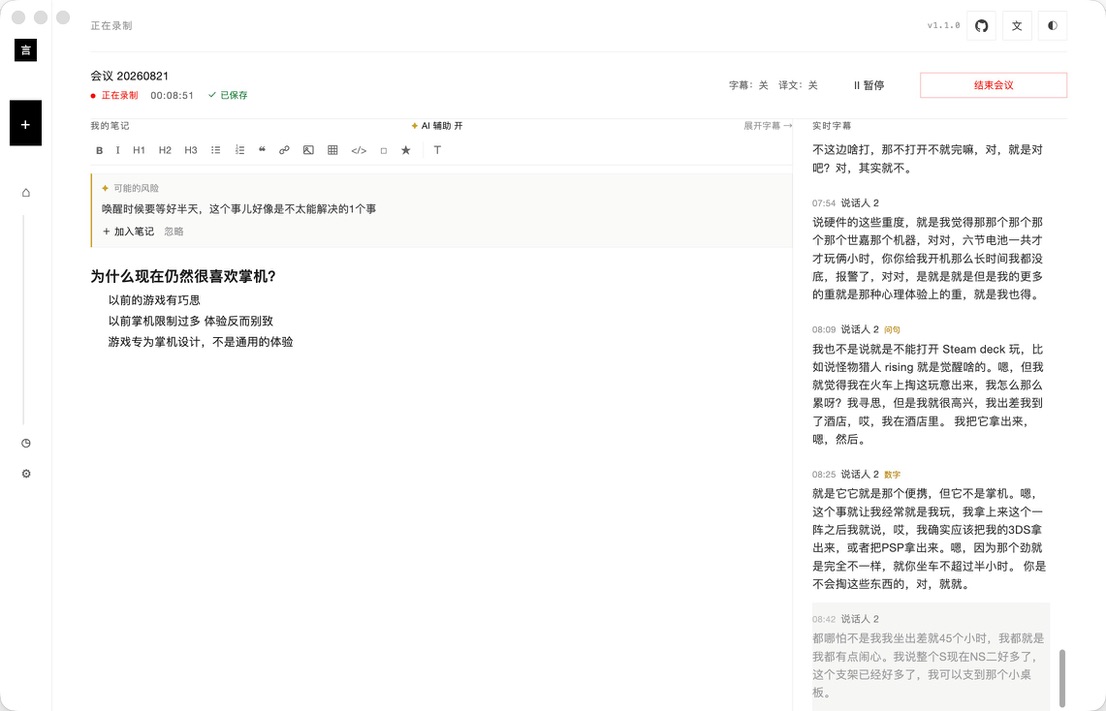
I landed on AI-assisted notes. In a meeting, you can sometimes stare at a blank note and not know where to begin. Having AI offer a few prompts or ideas could be useful. After a simple design and some experimentation, I settled on this: AI uses recent subtitle content to summarise meeting topics, key points, and suggested lines of thought for different time spans. With an approval action, users can automatically add the AI’s suggestions to their meeting notes. After two days of optimisation and polishing, this feature shipped in v1.1.0.
A copilot for notes—not a bad idea, right?
community feedback
I promoted it with posts on Xiaohongshu, LinkedIn, X, and Reddit. I even spent a small amount on traffic on Xiaohongshu, which brought in two genuine, high-quality users—haha, a very high conversion rate! I am grateful for their feedback and suggestions. In the latest two versions, I fixed several bugs I had not noticed before.
With the release of v1.1.2, Brevia’s first development phase has now come to a close. I do not plan to add major new features in the short term; the focus will be routine patches and bug fixes.
August 21, 2026, Suzhou